
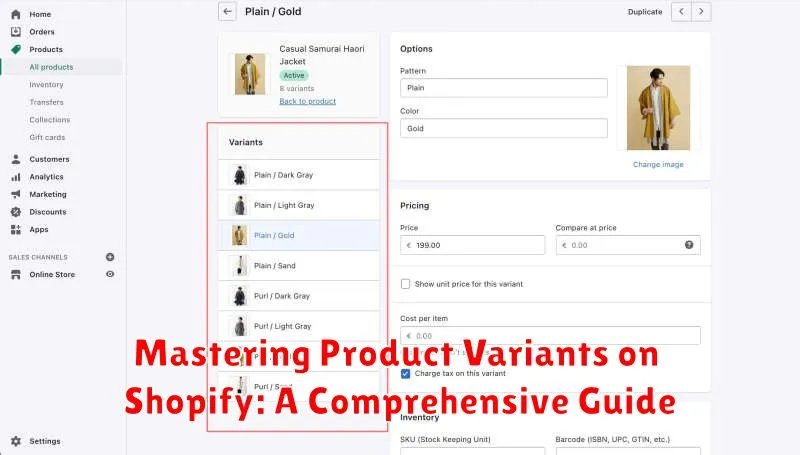
Mastering product variants is crucial for any Shopify store owner looking to optimize their online business. This comprehensive guide provides a detailed exploration of Shopify product variants, encompassing everything from basic setup and management to advanced strategies for maximizing sales and improving customer experience. Whether you’re dealing with size variations, color options, material differences, or any other customizable product feature, understanding how to effectively utilize variants on Shopify is essential for streamlined inventory management and a seamless shopping experience. This guide will equip you with the knowledge and tools to leverage the full potential of Shopify’s variant system, ultimately boosting your store’s efficiency and profitability.
From managing a small number of product variations to scaling up to a complex array of customizable options, this guide caters to all levels of Shopify users. We’ll delve into the nuances of creating variants, managing inventory for each variation, pricing strategies for different options, and best practices for showcasing your product variants in a user-friendly manner. Learn how to avoid common pitfalls, streamline your workflow, and ultimately convert more browsers into buyers by mastering the art of product variants on Shopify. This guide aims to be your definitive resource for everything related to Shopify variants, empowering you to take full control of your product offerings and optimize your store for success.
Understanding Product Variants and Their Importance
Product variants are the different versions of a single product that you offer in your Shopify store. These variations can be based on attributes like size, color, material, or any other defining characteristic. Instead of creating separate product listings for each variation, variants allow you to group them under one main product, streamlining your store’s organization.
Understanding how variants work is crucial for efficient inventory management and a positive customer experience. Imagine a t-shirt available in small, medium, and large, and in red, blue, and green. Each combination of size and color represents a variant. Using variants prevents the need to create nine separate product listings for the same t-shirt.
The primary benefit of using product variants is a simplified shopping experience for your customers. They can easily select their desired options from a dropdown menu or other selection tools on a single product page. This contributes to a cleaner, more organized storefront and reduces confusion.
Creating Product Variants in Shopify
Adding variants to your products allows customers to select specific options like size, color, or material. This section outlines the process of creating product variants within your Shopify store.
Steps to Create Variants:
-
Navigate to Products: From your Shopify admin, go to the “Products” section.
-
Add or Edit a Product: Either select an existing product to edit or click “Add product” to create a new one.
-
Scroll to the “Variants” Section: Locate the “Variants” section within the product details page.
-
Select “Add variant”: Click the button to add a new variant.
-
Define Options: Choose an option name (e.g., “Size”) and input the available option values (e.g., “Small,” “Medium,” “Large”). Repeat this process for each option you want to offer.
-
Input Variant Details: For each variant created, specify details such as price, SKU, barcode, and inventory quantity.
-
Save Changes: Ensure you save the product changes to apply the newly created variants.
By following these steps, you can effectively create product variants to cater to diverse customer preferences.
Managing Variant Options and Inventory
Effectively managing your product variants is crucial for a smooth Shopify experience. This involves controlling both the available options and tracking inventory levels.
Managing Variant Options
Within your Shopify admin, navigate to the “Products” section and select the product you wish to modify. Under the “Variants” section, you can add, edit, or delete variant options. Ensure your options are clearly labeled and logically organized for easy customer navigation. For example, use “Size” and “Color” instead of generic labels like “Option 1” and “Option 2”.
Managing Inventory
Inventory tracking prevents overselling and keeps your customers informed. For each variant, you can input the current stock quantity. Shopify provides options for automated inventory tracking and low stock alerts, allowing you to proactively restock and avoid lost sales. Activating these features streamlines your inventory management process. You can also set inventory policies for each variant, deciding whether to continue selling when inventory reaches zero or to prevent further sales.
Customizing Variant Images and Pricing
Visual presentation and accurate pricing are crucial for each product variant. Shopify allows you to tailor both, enhancing the customer experience and ensuring clarity.
Variant Images
Assigning specific images to each variant is essential for showcasing differences like color, size, or style. When a customer selects a variant, the corresponding image should dynamically update on the product page. This provides a clear visual representation of their selection, minimizing confusion and potential returns. Ensure each variant has high-quality images accurately reflecting its attributes.
Variant Pricing
Accurate pricing is paramount. Shopify allows you to set individual prices for each variant, reflecting potential cost differences based on material, size, or features. Clearly display the price associated with the selected variant. Consider using comparison pricing to highlight any price adjustments from the base product price. This transparency builds trust with customers and streamlines the purchasing process.
Using Variant Metafields for Advanced Customization
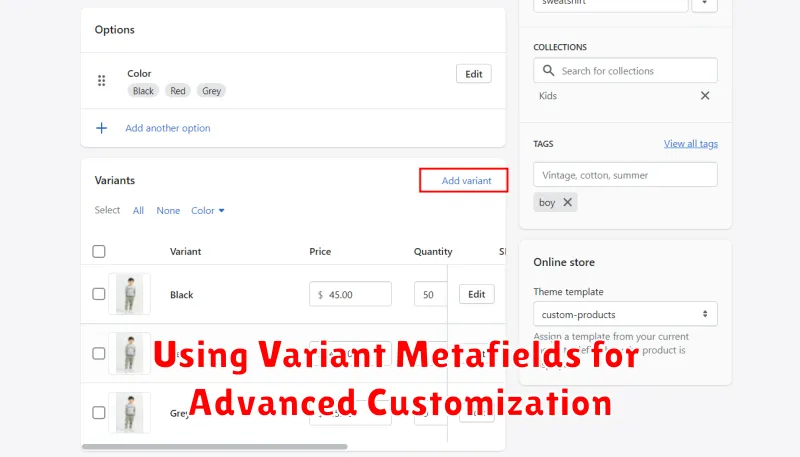
Variant metafields offer a powerful way to add custom data to your product variants beyond the standard Shopify options. This allows for highly specific customizations and integrations with third-party apps.
You can use metafields to store information such as:
- Material specifications
- Dimensions or weight variations
- Care instructions specific to a variant
- Importer or manufacturer details
- Country of origin
Accessing and utilizing these metafields requires some technical knowledge, often involving theme code edits or using specialized apps. However, this extra effort allows for a level of granular control that standard variant options can’t provide.
Defining Metafields: Before using metafields, define them within your Shopify admin. Specify the namespace, key, and value type (e.g., text, number, JSON). This establishes the structure for your custom data.
Integrating Metafields: Once defined, metafields can be integrated into your storefront using Liquid code. This enables you to display variant-specific information to customers, enhancing their shopping experience and providing them with more detailed product data.
Setting Up Variant-Based Shipping Rules
Variant-based shipping allows you to define specific shipping rates for different product variants. This is crucial for businesses selling items with varying sizes, weights, or fragility. Accurately calculating shipping costs based on these factors prevents revenue loss and ensures customer satisfaction.
Within your Shopify admin, navigate to the “Shipping and delivery” section. Shipping profiles are key to managing variant-based rules. Create a new profile or modify an existing one. You can then assign specific products to this profile. Within the profile, you can define rates based on various criteria.
Weight-based rates are a common method. Simply input the weight for each variant, and set corresponding shipping costs. Location-based rates allow you to charge differently based on the customer’s delivery address. Consider using calculated rates for real-time pricing from carriers, providing accurate shipping costs at checkout.
Remember to clearly communicate your shipping policies to customers. Transparency builds trust and reduces potential confusion during checkout.
Optimizing Product Variants for Search Engine Optimization

Properly optimizing product variants is crucial for maximizing your Shopify store’s visibility in search engine results. This involves strategic keyword usage and structured data implementation to ensure each variant is easily discoverable by search engines.
Unique Titles and Descriptions: Craft unique titles and descriptions for each variant, highlighting the specific attributes that differentiate them. For example, instead of simply using “T-Shirt,” use “Men’s Red Cotton T-Shirt – Size Large” for a specific variant.
Structured Data Markup: Implement structured data markup, such as schema.org, to provide search engines with detailed information about each variant. This helps them understand the specific attributes and values, like color, size, and material, improving the accuracy of search results.
Avoid Duplicate Content: While unique descriptions are important, be mindful of duplicate content issues. Focus on highlighting the unique aspects of each variant without simply replicating content across multiple product pages.
Troubleshooting Common Variant Issues
Encountering issues with product variants is a common experience for Shopify merchants. This section addresses frequent problems and offers solutions.
Variant Limit Reached
Shopify has a limit of 100 variants per product. If you exceed this, consider using a third-party app that manages variants differently, or simplifying your product options.
Variants Not Appearing on Product Page
Double-check your variant inventory. If a variant is out of stock and you’ve configured your store to hide out-of-stock items, it won’t appear. Also, ensure the variant is published and linked correctly to the product.
Price or Inventory Not Updating
Sometimes, changes to price or inventory don’t immediately reflect on the product page. Try clearing your browser’s cache and cookies, or waiting a few minutes for the changes to propagate.
Inconsistent Variant Display
If variants appear inconsistently across different devices or browsers, there might be a conflict with your theme’s code. Contact your theme developer or Shopify support for assistance.
Best Practices for Managing Product Variants on Shopify
Effectively managing product variants is crucial for a streamlined Shopify store. Here are some best practices to consider:
Logical Variant Organization
Use a consistent and logical naming convention for your options and values. For example, if you sell t-shirts, use “Size” for the option name and “Small,” “Medium,” “Large” for the values, rather than inconsistent terms like “S,” “M,” “L” or “Shirt Size.” This improves both your store’s backend organization and customer experience.
Variant Limits
Shopify has a limit of 100 variants per product. While this is usually sufficient, if you exceed this limit, consider grouping similar products or using a third-party app to manage a larger number of variants.
Inventory Tracking
Accurate inventory management is essential for each variant. Ensure you’re tracking inventory for each variant separately to avoid overselling and disappointing customers. Shopify’s built-in inventory management tools can assist with this.
High-Quality Images
Provide clear images for each variant whenever possible. This allows customers to see exactly what they’re purchasing and reduces returns due to misunderstandings about the product’s appearance.
